Survival
Everything you need to know about the survival server.
- Getting Started
- Land Claims
- TradeShops and Adverts
- Blue Map
- Resource world
- QoL Features
- Alliances
- Ranks
- Custom Advancements
Getting Started
Joining the server
If you haven't already added the server you can find out how to do that here. When you join you will find yourself in the lobby. You can either walk through the survival portal or right click the compass and click on survival.
Teleport away from spawn
When you first spawn in, you will spawn in the centre of town. Since you will be unable to break things at spawn unless you make a claim or have a certain amount of playtime you can teleport to a random place at the edge of spawn using /rtp. You can only use this command when you have the castaway rank.
Other useful things to know
If you get stuck in someone's claim you can use /trapped to escape.
You can claim your land so that it is protected from other players.
You can also link your bedrock account you your java edition account so that you have your inventory and progress on both platforms.
You can find all the other quality of life features here.
Land Claims
Create a Claim
To create a claim: do /claim or use a golden shovel and right click two opposite corners of where you want to claim. You can left click a block to see if it is claimed and who it is claimed by. Your claims will expire after a certain amount of time, depending on your rank.
Expand Your Claim
/claimexpand [number of blocks] [direction]
- Expands the claim that you are in by a certain amount of blocks in a specific direction.
- If you do not put the direction it will expand in every direction, you can also put multiple directions.
/claimcontract [number of blocks] [direction]
- Shrinks the claim that you are in by a certain amount of blocks in a specific direction.
- If you do not put the direction it will expand in every direction, you can also put multiple directions.
You are currently unable to expand your claim at spawn, we are waiting on the plugin devs for a fix. If you want to change your claim you will have to remake it.
Let people use your claims
If you want to let other people do things in your claims, you can do /trust while standing in the claim and then their username. This will give them builder permissions by default if you do not specify the permission level. You can also trust your alliance or everyone. If you want to give people some permissions you can do /claimflags while standing in the claim to toggle different permissions (These will apply to everyone).
You can give people different levels of trust:
- None:
- Revokes a player/group's access to your claim
- Accessor:
- Grants a player/group access to interact with all blocks except inventory (chests and other containers)
- Resident:
- Grants a player/group ability to create claims, includes accessor trust.
- Container:
- Grants a player/group access to interact with all blocks including inventory, includes accessor trust.
- Builder:
- Grants a player/group access to everything above, except Resident, including ability to place and break blocks
- Manager:
- Grants a player/group access to all of the above including ability to modify claim
Trust alliance members
- /alliance trust
- Trust alliance ranks in the claim you're standing in
- /alliance untrust
- Untrusts an alliance rank in the claim you're standing in
Claim blocks
You have a limited amount of claim blocks that you can use. You can get more claim blocks from ranking up, doing /voteall and voting on all of the websites and entering your username, buying claim blocks from Bob at spawn with either diamonds or Phuzzy Bucks, or buying claim blocks with real money from the donations page.
You can only create a maximum of two claims at spawn, depending on what rank you are.
TradeShops and Adverts
Create a Tradeshop
To create a tradeshop, place a sign on a chest and type:
- [trade]
- Product
- Cost

Use the format of the item name that shows when you press F3 + H, for example "iron_ingot" or "diamond". You can use any item for both the product and the cost. If you want to use an item with specific data like a special name or enchantment, use /ts addCost or /ts addProduct while selecting what you want to use in your hand. If the item name is too big to fit on the sign you will have to use a command.

Trade Shop Commands
- /ts addCost [material] [number]
- Adds/changes the cost, you can use either the item name or hand to use the item that is currently in your hand.
- /ts addProduct [material] [number]
- Adds/changes the product, you can also use either the item name or hand to use the item that is currently in your hand
- /ts random
- Randomly picks items from the chest
- /ts cooldown [time]
- e.g. 5h 12m or 30s
- Limits purchases after x amount of time and can be set to 0 to disable
- /ts close
- Closes the tradeshop so no one can buy from the tradeshop
- /ts open
- Opens the tradeshop so that people can buy from it (this is on by default)
- /ts removeCost
- Makes the cost free
- /ts removeProduct
- Removes the product item from the trade shop
Managers
- /ts addManager
- add a manager to a trade shop
- this allows them to edit the trade shop
- /ts removeManager
- remove a manager
- /ts listManagers
- view all managers of the trade shop
Adverts
You can create an advert to advertise your shop in the adverts gui.
- /advert open
- Allows you to view all adverts
- /advert create
- Shows a gui that lets you create an advert
- /advert edit
- Shows a gui that lets you edit your advert
- /advert delete
- Deletes your advert
Blue Map
Blue map allows you to see a 2D and 3D map of the server, you can also see where players and claims are.
You can access the link by going to http://mc.fortunecraft.net:25578/
Commands
- /bmpc hide
- Hides your location on the map (your claims are still visible)
- /bmpc show
- Shows your location on the map
Resource world
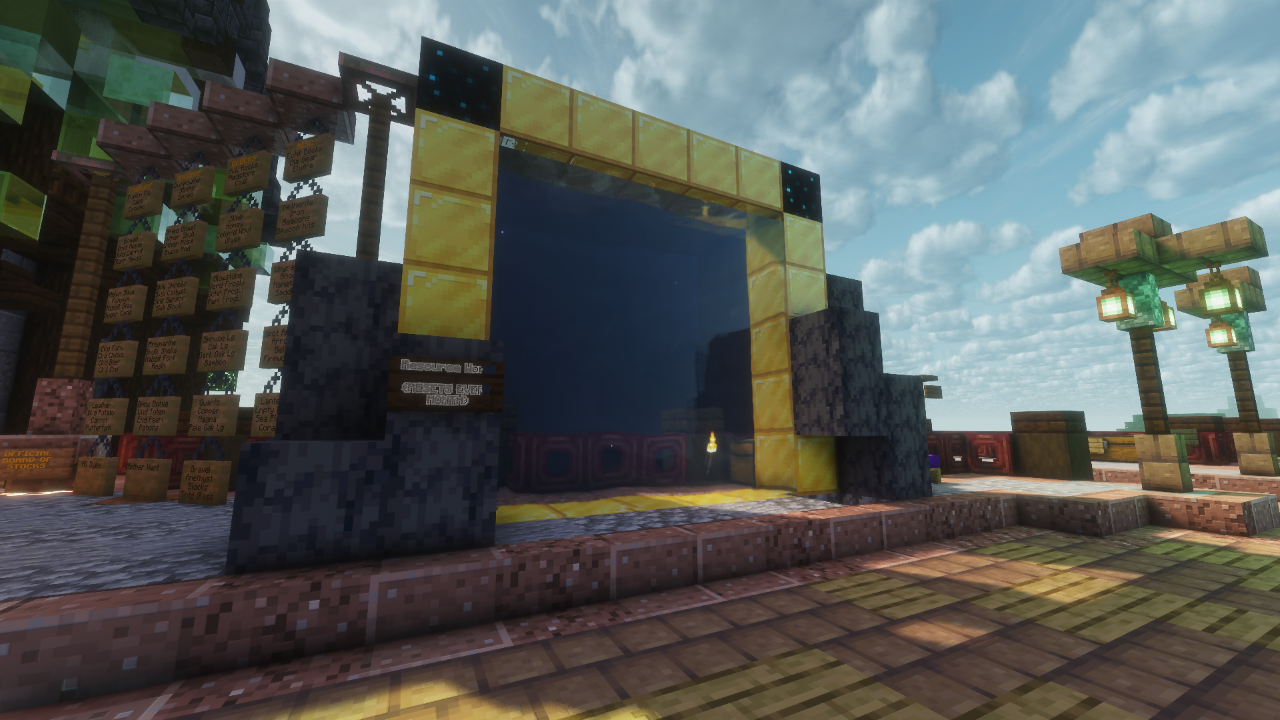
Do you keep running into peoples claims when mining? You can find the portal to the resource world at the centre of spawn and mine to your hearts content. This world resets monthly and has no claims so you can mine wherever you want! When you are in this world you can do /spawn to teleport to spawn if you get lost.
QoL Features
Crafting
Most slabs and stairs can be crafted back into full blocks.
Right click dirt or concrete powder on a cauldron full of water will turn them into mud or concrete respectively.
You can recolour coloured blocks like glass.
/stonecutter allows you to use the stonecutter without bringing one around with you (this requires a rank)
Armor Stands and Mobs
Renaming flint to "Editor" (without the quotation marks) will let you right click to bring up a menu. This lets you pose Armor stands however you please. once you have selected a mode, right or left click on an Armor stand to edit it.
If you rename a name tag to "silence me" (without the quotation marks) and name a mob it will stop making noises.
Emails
- /emails
- view emails
- /email [player] [message]
- send a player a message that they can view whenever
Text
Use Minecraft colour codes to change the colours of text. (requires a rank)
Examples:
Input text | Display text |
&6Text | Text |
&1Hello world | Hello World |
&dRocky &3Road | Rocky Road |
Colour Codes
Colour | Chat code | Hex code | |
⦿ | Black | &0 | #000000 |
⦿ | Dark Blue | &1 | #0000AA |
⦿ | Dark Green | &2 | #00AA00 |
⦿ | Dark Aqua | &3 | #00AAAA |
⦿ | Dark Red | &4 | #AA0000 |
⦿ | Dark Purple | &5 | #AA00AA |
⦿ | Gold | &6 | #FFAA00 |
⦿ | Gray | &7 | #AAAAAA |
⦿ | Dark Gray | &8 | #555555 |
⦿ | Blue | &9 | #5555FF |
⦿ | Green | &a | #5555FF |
⦿ | Aqua | &b | #55FFFF |
⦿ | Red | &c | #FF5555 |
⦿ | Light Purple | &d | #FF55FF |
⦿ | Yellow | &e | #FFFF55 |
⦿ | White | &f | #FFFFFF |
Sleep
You can vote to skip the night, as if you slept in a bed. If enough people click on yes in the chat, the night will be skipped.
Voice Chat
The server is compatible with Simple Voice Chat, which adds proximity chat.
You can download Simple Voice Chat here.
Distant Horizons
This server has the Distant Horizons plugin, this means that if you have the mod, you do not have to load the chunks yourself for distant horizons to show them.
You can download Distant Horizons here.
Buck
Buck is a mob that will occasionally spawn next to a random player. If you kill It, it will give you a few PhuzzyBucks, which you can use for various different things, including buying claimblocks from Bob at spawn or games on Phuzzy's Discord Server.
If you have not linked your account with discord you will not get any PhuzzyBucks, you can find out how to do that here.
Discord Chat
You can message people on the server through discord in #survival-chat.
The End Dimension
Tired of waiting for the end update? Well wait no longer because we have a fancy plugin that changes up the end to make it much more fancy!
Switch Servers
You can do /lobby /survival /creative or /skywars to switch between the different servers.
Alliances
Creating an alliance allows you to make a group of up to 30 people. You can give trust to everyone in your alliance in a claim and give them a discount at your shops. You can also use alliance chat to chat with just your alliance.
Commands
- /alliance create
- Opens alliance creation GUI
- /alliance invite
- Invite someone to your alliance
- /alliance accept
- Accept an alliance invitation
- /alliance deny
- Deny an alliance invitation
- /alliance trust
- Trust alliance ranks in the claim you're standing in
- /alliance untrust
- Untrusts an alliance rank in the claim you're standing in
- /alliance leave
- Leave the alliance
- /alliance kick
- Opens the alliance kick GUI
- /alliance promote
- Promotes the target to officer rank
- This lets them manage the alliance
- /alliance demote
- Demotes a target back to member
- /achat
- Toggles alliance chat
- This makes your chat messages only visible to people in your alliance
- /alliance transferowner
- Transfer ownership to someone in the alliance
- /alliance info
- Displays all players within the alliance
- /alliance colour
- Change the colour of your alliance name
- /alliance tradeshop discount
- Toggle discount for tradeshops
- /alliance disband
- Disbands the alliance
- /listallalliances
- Lists all created alliances
Ranks
Ranks give you Claimblocks and QoL features for playing on the server.
You can do /ranks to see your ranks.
Playtime does not include afk time
- 0 HOURS - Castaway
- 30 Days Claim Expiration.
- 5 HOURS - Swabbie
- Permission to make 1 Claim at Spawn, Access to /trash.
- 10 HOURS - Scallywag
- 125 Claim Blocks per Hour, Access to /alliance create, Ability to Build at Spawn.
- 25 HOURS - Scoundrel
- Access to /color, Ability to use Red, Green and Blue Chat Colours.
- 50 HOURS - Marauder
- 150 Claim Blocks per Hour, Permission to make 2 Claims at Spawn,.
- 100 HOURS - Deckhand
- Access to /hat, Access to /stonecutter, Ability to add Coloured Text to Signs by using Colour Codes.
- 200 HOURS - Voyager
- Increase Claim Expiration to 45 Days, Ability to use Yellow Chat Colour.
- 300 HOURS - Explorer
- Access to /nick, Access to /lore.
- 400 HOURS - Swashbuckler
- Increase Claim Expiration to 60 Days, Ability to use Purple Chat Colour.
- 500 HOURS - Seadog
- Ability to use Colours in Nicknames, Ability to rename items with Colour in a Anvil.
- 750 HOURS - Privateer
- Ability to use Rainbow Chat Colour, Access to /book.
- 1000 HOURS - Quartermaster
- 175 Claim Blocks per Hour.
- 1250 HOURS - Commodore
- 200 Claim Blocks per Hour.
- 1500 HOURS - Admiral
- Increase Claim Expiration to 75 Days.
- 1750 HOURS - Captain
- Increase Claim Expiration to 90 Days.
- 2000 HOURS - Pirate Lord
- Increase Claim Expiration to 120 Days. Get RocketManKian's Head. Get PhuzzyBond's Head. Get JackieBond's Head.
Custom Advancements
Mud Lover
- Throw Dirt in a Cauldron and make Mud
Playaholic
- Unlock a Playtime Rank
Plotting King
- Claim your first piece of Land
Stocking Blocks
- Purchase some Claim Blocks from Bob
Red Herring
- This Advancement is a Red Herring
Self Promotion
- Create your first Advert
End of the World
- Reach the World Border
The Shrouded Buck
- Find and Kill Buck 5 Times
Vibrant Thoughts
- Rename an Item using Colour Codes in a Anvil
Wandering Trader
- Make a Tradeshop
Colourful Collective
- Add some Colour to your Alliance Name
Colourful Imagination
- Use Colour Codes on a Sign
Creative Mind
- Edit a Sign
Discount Frenzy
- Enable Alliance Discount using the Command
DuckManKian
- The only hint is... Name Tag.
Egg Collector
- Pickup the 'Bootleg Dragon Egg'
First Customer
- Sell your first item in a TradeShop
Head Hunter
- Collect a Head by killing a Player
Do you want to Alliance?
- Make or join an Alliance
A Bucky Find
- Find and Kill Buck
We also have other custom advancements which you can find here.